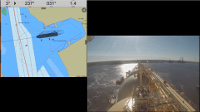

Our newest app, SEAiq Pilot, is designed to support specialized features used by river and harbor pilots. Among these features are capabilities to help in docking large vessels, which is described in this post.
Docking aids is intended to be used with a sensor that provides accurate Rate-of-Turn (ROT) sensor data, such as from a Portable Piloting Unit (PPU) or using the vessel's ROT sensor via a pilot plug. This allows SEAiq Pilot to estimate the movement of various points on the vessel, accounting for the vessel's rotation and the position of the antenna on the vessel. Note that SEAiq Pilot supports all major brands of WiFi based PPUs and pilot plugs.
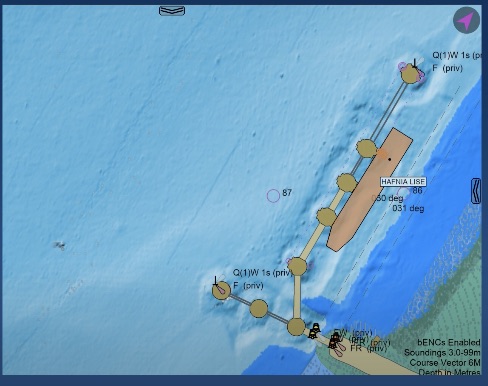
In the screenshots below, the setting
Setting / Truescale Vessel / Show True-scale Vessel at Tick-marks has been set to ON. This causes an outline of the vessels predicted position of the vessel in 1, 2, and 3 minutes to be displayed using dotted lines.
 |
| Vessel predicted position and secondary course lines |
When docking aids are enabled you get extra information about your vessel's movement. Secondary course lines are provided for various points on the vessel. In the image below then vessel is rotating about its bow. You can see that in addition to the vessel's predicted position, secondary course lines (also dotted) are displayed for the vessels movement over the next 6 minutes. With course lines and predicted position, the actual movement of the vessel is apparent.
Note that when ROT data is available, SEAiq uses the ROT and antenna position to correct the SOG/COG sensor data so that the data displayed applies to the center of the vessel. In the image above, the antenna itself (shown as a solid dot toward the aft of the vessel) actually has a COG of 251 deg True and SOG of 1.2kts. However, much of that speed is caused by its rotation about the center of the vessel. Correcting for rotation of the antenna, the center of the vessel has a COG 259T and SOG 0.4kts, which are the values shown.
 |
| Additional docking aids when approaching wharf |
As the vessel approaches the wharf it is coming alongside, additional information is provides. First, note that the context-sensitive data in the statusbar on the right includes a section on docking. It give the distance and relative speed to the wharf of the bow and the stern of the vessel. It also gives the angle of the vessel relative to the wharf and the ROT.
Similar information is also displayed on the chart display, in addition to the predicted position of the vessel. You can see the distance to the wharf of key parts of the vessel and the velocity relative to the wharf. Also, the angle to the wharf is given (25.2 degrees).
Using the docking aids is simple and explained fully in the Help under
Settings / Docking. (1) Create a route with exactly two waypoints that defines the wharf you are coming along, (2) Set the name of the Wharf under Settings / Docking (see below), (3) Set Display Docking Aids to ON. You will see the current status of the docking aids in the Status field.